
TL;DR: This AI image-to-video workflow uses GPT Image 2 to create photorealistic keyframes, then animates them with Seedance 2.0 into cinematic 2K clips with native audio. It replaces a traditional film crew for a fraction of the cost. This guide covers single image-to-video, 3×3 storyboard grids, multimodal production, character consistency fixes, and UGC ads — all with copy-ready prompts.
Want to animate AI images into a cinematic 15-second trailer with synced sound? Or keep the same character looking identical across multiple shots? Here's the exact AI video generation workflow professionals are using in 2026.
Why GPT Image 2 + Seedance 2.0 Is the Best Image-to-Video Pipeline
On April 22, 2026, OpenAI opened GPT Image 2 to all ChatGPT users. Within 24 hours, creators using Seedance 2.0 (ByteDance, February 2026) started posting results that stopped people mid-scroll.
Not "good for AI." Indistinguishable from professional production.
Fake game trailers fooled communities into thinking they were real leaks. UGC-style product ads outperformed human-shot creative. Short films held character consistency across scenes. All from two tools and a text prompt.
The structural match is what makes this the most reliable image-to-video pipeline available right now:
- GPT Image 2 excels at dense, structured visual assets — storyboard grids, character sheets, keyframes with correct text and anatomy.
- Seedance 2.0 reads those structured images as production inputs. It interprets composition, panel layout, lighting, and style, then animates them with motion and sound.
One tool plans. The other executes. Together they replace a photographer, model, director, and editor — for a fraction of the cost and time.
What Is GPT Image 2? Features, Limits, and Keyframe Strategy
The Four Biggest Improvements
GPT Image 2 (gpt-image-2) is the first AI image model to clear genuine commercial usability across the board. Earlier models had strengths but critical failure modes. This one addresses all of them.
Text rendering is solved. Chinese, English, multilingual layouts, complex typesetting — all correct. Generate a poster, an app screenshot with readable UI, or a multi-language ad without fixing broken letterforms in Photoshop.
Human anatomy is reliable. Hands and faces — historically the biggest AI tells — now score higher than Nano Banana Pro on physical plausibility. Community testers describe the "AI feel" as almost gone.
Instruction following jumped dramatically. The knowledge cutoff extends to December 2025. The more specific your prompt, the more precise the execution.
Thinking Mode enables batch generation. Connected to ChatGPT's reasoning model, it can browse for reference, reason through composition, and produce up to 8 consistent images in one request — ideal for storyboards.
What It Still Can't Do
- Extremely dense textures (fine sand, dense crowds) still approach the ceiling
- Complex spatial geometry (origami, Rubik's cube faces) remains unreliable
- Arrow and callout accuracy in technical diagrams needs review
- Very small text blocks sometimes need local cleanup
For the image-to-video workflow, the key limit is structural clarity. Images that work best as Seedance inputs have clean subject-background separation, consistent internal lighting, and unambiguous focal points. Complexity that reads well as a still can confuse a video model about what should move.
The Keyframe Prompt Structure
For still images intended to be animated, your prompt needs to do more than look good — it needs to function as a reference a video model will interpret.
[Subject + precise physical description]
[Environment + lighting direction + quality]
[Camera angle + framing + depth of field]
[Mood + visual style + photographic reference]
[Technical specs: aspect ratio, resolution]
[Explicit instruction: no AI feel, no artifacts]
Avoid in keyframes for Seedance:
- Motion blur (confuses the video model)
- Extreme Chiaroscuro (bakes shadows into the reference)
- Cluttered backgrounds with many moving-capable elements
- Text overlaid on the subject (animates with background)
Access and Pricing
| Account Type | Daily Limit | API Access |
|---|---|---|
| Free | Monthly limited quota | No |
| Plus (~$20/mo) | ~100 images/day | No |
| Pro (~$200/mo) | ~500+ images/day | No |
| API (pay-per-use) | Unlimited (metered) | Yes, up to 2K |
For most creators, Plus is the right tier. For production pipelines, the API with model name gpt-image-2 is the correct path. Supported ratios: 1536×1024 (landscape), 1024×1536 (portrait), 2048×2048 (square), and more.
How Seedance 2.0 Works: Multimodal Inputs and @ References
What It Actually Is
Seedance 2.0 is ByteDance's latest video generation model, built on a unified multimodal audio-video joint generation architecture. The key word is "joint" — it generates video and audio simultaneously from the same model, not video-then-audio.
It supports four input types (text, image, video, audio) and up to 12 reference assets per generation: 9 images + 3 video clips + 3 audio files. Output: up to 15 seconds at up to 2K resolution with native synchronized sound.
The model thinks like a director, not a renderer. Given a storyboard grid, it reads it as a shot sequence. Given a character reference, it treats it as a persistent identity anchor. Given a video reference, it extracts camera movement intent. This interpretive layer is what makes the GPT Image 2 → Seedance 2.0 pipeline powerful.
The @ Mention System
The @ syntax is the most important control mechanism. Every uploaded file gets a tag (@Image1, @Video1, @Audio1), and your prompt assigns meaning:
@Image1 as the character reference — maintain face and clothing exactly.
@Image2 as the background scene reference.
@Video1 for camera movement style only — replicate the dolly timing.
@Audio1 as the ambient soundtrack.
Without explicit @ usage, Seedance guesses. With it, you write a structured production brief. When you upload a GPT Image 2 keyframe and say @Image1 as the opening frame, you create a visual anchor for the entire generation. Practitioner testing shows roughly 80% reduction in facial drift compared to text-only video generation.
Native Audio: What It Actually Produces
Including audio direction influences both the sound and the pacing:
- Ambient effects: rain, traffic, wind, crowd murmur — generated in sync with the visual
- Music and score: "war drums," "lo-fi piano," "orchestral swell" shape the soundtrack
- Dialogue and lip sync: describing speech + tagging a voice reference via
@Audio1enables synced speech in 8+ languages including Chinese dialects
For product videos, atmospheric content, and moodpieces, you skip post-production audio entirely.
Where to Access Seedance 2.0
Official routes target the Chinese market (Jimeng AI / Dreamina, Douyin, Volcano Engine API). For English-speaking creators, JustDance.cc offers two interfaces:
justdance.cc/ai-image-to-video — The clean path for core workflows. Upload your GPT Image 2 output, write a motion prompt, generate. No regional restrictions, no phone verification.
justdance.cc/ai-video-to-video — Full multimodal: reference image + video clip for camera movement + audio file, all in one session. Accepts the complete 12-asset input spec with @ syntax for precise role assignment. Use this for character-consistent multi-shot work, storyboard-driven production, or matched-audio content.
Both output up to 2K with native audio.
Workflow 1: Single Image-to-Video (Entry-Level Setup)
The entry point for any AI image-to-video workflow. One GPT Image 2 keyframe becomes one Seedance 2.0 clip. Best for product demos, atmospheric brand moments, portrait animation, and any single-scene use case.
Step-by-Step
Step 1: Generate the keyframe
Use ChatGPT's image generation mode. Write a specific, production-oriented prompt. Download the highest quality version.
Step 2: Upload to justdance.cc/ai-image-to-video
Your image appears as @Image1.
Step 3: Write the motion prompt
Structure: reference instruction → action → camera → lighting → audio.
@Image1 as the scene and character reference. Preserve the composition and lighting.

[Action: what moves, how, at what pace]
[Camera: push-in / pan left / static / orbit]
[Lighting: stays consistent / shifts direction]

Audio: [environment sound] / [music style] / [no music]
Step 4: Set parameters
- Resolution: 1080p for most uses; 2K for maximum quality
- Duration: 5s for a tight cut, 10s for a slower scene, 15s for full atmosphere
- Mode: Standard (not Fast) for publishable output
Step 5: Review and iterate
Watch for face drift, camera smoothness, audio-visual sync. Usually 2–3 iterations to publishable quality.
What Works Best
- Product rotation and reveal
- Portrait animation with subtle motion (hair, expression, light)
- Environmental moodpieces (landscape with moving elements)
- Brand visual idents with logo animation
Workflow 2: 3×3 Storyboard Grid for Multi-Shot AI Video
The biggest unlock of this AI video generation pairing. Multi-shot, narratively coherent video in a single generation — far more controllable than standard text-to-video alone.
The Core Concept
Generate a 3×3 grid where each of the 9 panels represents one shot. Feed this grid as Seedance 2.0's starting frame, with a prompt describing motion, camera, and audio for each panel in sequence.
Seedance reads the grid as a multi-shot storyboard and animates the panels as separate shots in a 15-second continuous video, with natural transitions.
Advantages over single-image or text-to-video:
- Pacing is controlled before the video model — narrative structure visible as a static image first
- Character consistency is dramatically stronger — same character across all 9 panels in one unified image
- Shot composition is precise — framing, angle, and scene set in GPT Image 2, not the video prompt
- The model treats it as a sequence — Seedance interprets panel ordering as temporal direction
How to Write the Grid Prompt
Describe each panel individually within a structured grid. GPT Image 2 handles consistent visual style automatically as long as your prompt establishes it clearly.
Grid Prompt Structure:
A 3×3 storyboard grid for a [genre] [video type].
Consistent visual style throughout: [style description].
Same characters appear across relevant panels.

Panel layout (left-to-right, top-to-bottom):
Panel 1 (top-left): [shot description]
Panel 2 (top-center): [shot description]
Panel 3 (top-right): [shot description]
Panel 4 (middle-left): [shot description]
Panel 5 (middle-center): [shot description]
Panel 6 (middle-right): [shot description]
Panel 7 (bottom-left): [shot description]
Panel 8 (bottom-center): [shot description]
Panel 9 (bottom-right): [shot description]

Thin black panel borders. Cinematic aspect ratio within each panel.
High detail, no AI artifacts. Square overall format, 2K resolution.
Example: Fake Game Trailer Storyboard
One of the most viral applications — and a perfect illustration of why grid-based character consistency works. When all characters exist in one unified image, they stay visually coherent across all nine animated shots.
GPT Image 2 Prompt:
A 3×3 cinematic storyboard grid for a dark fantasy action game trailer.
Consistent style: ultra-realistic game engine aesthetics, dramatic
directional lighting, cinematic color grading (teal and orange).
The same armored protagonist appears across relevant panels.

Panel 1: Wide establishing shot — fog-covered battlefield at dawn,
         silhouettes of an army on the horizon.
Panel 2: Medium shot — armored knight protagonist kneeling,
         planting their sword in cracked earth.
Panel 3: Close-up — protagonist's visor slowly opening,
         determined eyes catching the dawn light.
Panel 4: Action shot — protagonist charging through enemy forces,
         motion blur suggesting speed.
Panel 5: Dramatic wide — dark castle on a cliffside,
         lightning illuminating it from behind.
Panel 6: Interior shot — protagonist at a chamber door,
         torchlight flickering on stone walls.
Panel 7: Boss encounter — massive armored enemy raising a weapon,
         protagonist standing ground.
Panel 8: Climax — energy shockwave erupting between two warriors,
         debris flying.
Panel 9: Final frame — protagonist standing on the clifftop at sunrise,
         title card space at bottom.

Thin panel borders. Square overall format. 2K resolution.
No UI elements, no HUD. Pure cinematography.
Seedance 2.0 Video Prompt (upload grid to the multimodal interface):
@Image1 is a 3×3 storyboard grid. Animate as a 15-second game trailer
— each panel is one shot. Read left-to-right, top-to-bottom.

0:00–1.5s Panel 1: Camera slowly descends from the sky toward the
                   fog-covered field. Wind moves through the fog.
1.5s–3s Panel 2: Knight plants sword in slow motion. Dust rises.
3s–4.5s Panel 3: Visor opens. Eyes catch the light. Camera pushes in.
4.5s–6s Panel 4: Fast tracking shot — protagonist charging. Motion blur.
6s–7.5s Panel 5: Static wide shot. Lightning flashes. Thunder.
7.5s–9s Panel 6: Door torch flickers. Shadows shift. Silhouette.
9s–10.5s Panel 7: Boss raises weapon. Ground cracks. Camera tilts up.
10.5s–12s Panel 8: Shockwave erupts. Camera shakes. Slow-motion debris.
12s–15s Panel 9: Protagonist on clifftop. Wind in cloak. Slow zoom out.

Audio: epic orchestral score with war drums and brass, building from
tense silence to full swell. Environmental SFX per shot: wind, sword
impact, thunder, debris.
Critical Technical Notes
| Issue | Fix |
|---|---|
| Aspect ratio mismatch | Keep both grid and video at 1:1. Mismatched ratios cause unpredictable cropping. |
| Grid appears as opening frame | Trim first second in post, or make Panel 1 and Panel 2 the same shot for a 2-second runway. |
| Uneven pacing | Use timestamp-style timing ("0:00–1.5s Panel 1") so Seedance knows how long to spend on each shot. |
| Quality drop on multi-shot | Always use Standard tier, not Fast. The quality gap is most visible across sequences. |
| Need more than 9 shots | 4×4 grids (16 panels) work but require more precise timestamp control. 3×3 is the reliable starting point. |
Workflow 3: Full Multimodal Workflow (Image + Video + Audio)
The deepest capability for anyone building a professional AI video workflow, accessed through justdance.cc/ai-video-to-video. For creators who need precise control over camera movement style, pacing, and audio atmosphere.
What You're Uploading
| Asset | Tag | Purpose |
|---|---|---|
| Reference Image | @Image1 |
GPT Image 2 keyframe or storyboard grid. Anchors visual look, character identity, scene composition. |
| Reference Video | @Video1 |
A 5–15s clip demonstrating desired camera movement. Extracts motion intent, not visual content. A slow dolly from a nature doc, a rapid track from an action sequence. |
| Reference Audio | @Audio1 |
Music, ambient sound, or dialogue to sync to. Paces cuts, matches energy, informs soundtrack character. |
Sample Prompt
@Image1 as the character and scene reference.
Maintain her face, clothing, and the room's lighting exactly.

@Video1 for camera movement only — replicate the slow circular
dolly path and its steady, deliberate pace.
Do not replicate any other visual elements from @Video1.

@Audio1 as the background atmosphere.
Let the pacing of the music inform the editing rhythm.

The woman at the window slowly turns toward the camera,
her expression shifting from contemplative to a quiet smile.
Morning light catches her hair as she turns.
The city visible behind the glass stays still.

Add subtle ambient audio layered beneath @Audio1:
distant street sounds, soft interior hum.
Workflow Comparison
| Scenario | Recommended Workflow |
|---|---|
| Product showcase, simple scene | Single image-to-video |
| Multi-scene narrative, game trailer | Storyboard grid |
| Specific director-style camera movement | Full multimodal |
| Audio-driven content (music video style) | Full multimodal |
| Maximum character consistency across clips | Full multimodal |
| Quick test, first iteration | Single image-to-video |
How to Fix Character Drift in AI Video Generation
The hardest problem in AI video — keeping the same person looking identical across multiple clips. Seedance 2.0 addresses this through its "Universal Reference" architecture.
Why Characters Drift (and How to Stop It)
Traditional text-to-video treats each generation as independent. Describe "a woman with short brown hair and blue eyes" twice, you get two different women. Seedance 2.0's reference system creates what practitioners call "a persistent conditioning anchor." When you write @Image1 as the character reference, you initialize a variable in the model's latent space that constrains every subsequent frame.
Testing across production scenarios consistently finds roughly 80% reduction in facial drift versus text-only generation. Clothing color shifts and identity confusion — the two most common failures — are largely eliminated with correct reference usage.
The Ideal Character Reference Image
Generate dedicated references with these properties:
- Neutral expression, neutral lighting. Easier for Seedance to add cinematic lighting to a neutral face than to interpret one buried in Chiaroscuro shadows. A simple, well-lit, front-facing reference with a calm expression is the gold standard.
- Clear, distinctive features. Specific scars, unique accessories, unusual hair color — make them unambiguously visible. These become the model's anchor points.
- Clothing clearly visible. Full-body or three-quarter shots beat tight headshots for outfit consistency. Logos, patterns, textures need to be readable.
- One character per reference. Don't use group shots. The model needs a single, unambiguous subject.
GPT Image 2 Prompt for Character Reference Sheet:
A clean character reference sheet for [character description].
Three views: front-facing center, three-quarter profile left,
profile right. All views show the same character consistently.
Neutral expression across all views. Even studio lighting,
no dramatic shadows. Full body visible.
White or light gray background.
[Detailed description: age, ethnicity, hair, clothing, distinctive features]
High detail, photorealistic, no AI artifacts.
Square format, 2K resolution.
Tagging in Practice
Consistent tagging across every generation is essential. Changing the tag label between sessions breaks the anchor.
# Every prompt in this project uses:
@Character1 as the character reference — face, hair, and clothing exactly.

# Example Shot A:
@Character1 walking through a rain-soaked Tokyo street at night,
medium tracking shot, neon reflections on wet pavement...

# Example Shot B:
@Character1 seated in a café, warm interior light,
hands wrapped around a coffee cup, looking out the window...

# Example Shot C:
@Character1 running through a crowd,
wide shot tracking from behind, urgency in her stride...
With multiple views as separate images:
@Image1 for face reference (front view)
@Image2 for body/clothing reference (full body view)
Reference Strength: The Parameter Most People Miss
Most interfaces expose a "reference strength" parameter controlling rigidity versus creative freedom:
| Strength | Result |
|---|---|
| 70–80% | Best balance. Character matches reference; scene responds dynamically to camera and lighting. |
| Above 85% | Overly rigid. Characters lose natural micro-expressions; lighting feels frozen. |
| Below 60% | Noticeable drift. Character features wander between shots. |
For multi-clip projects, keep reference strength consistent at 75% across every clip.
Character Sheet Method for Illustrated/Anime Content
The storyboard grid principle extends to non-photorealistic work:
- Multi-angle character sheets (front/side/back views)
- Comic page panels featuring the character in action
- Expression sheets (neutral/happy/angry/surprised on one grid)
These structured assets feed into Seedance 2.0 the same way as storyboard grids, with the model animating expressions and poses while maintaining visual style consistency.
7 AI Video Use Cases: From UGC Ads to Game Trailers
AI UGC Ads
UGC-style advertising — casual, direct-to-camera, "real person" feel — converts exceptionally well. This AI video generation pipeline lets you produce UGC-style product ads difficult to distinguish from genuine creator content.
Workflow:
- Generate a "real person holding product" keyframe in GPT Image 2 — natural indoor lighting, candid framing, product visible
- Upload to justdance.cc/ai-image-to-video with a motion prompt: subtle head movement, natural hand motion, eyes shifting, realistic breathing
- Optional: add a voice reference audio file for synced dialogue via the multimodal workflow
The image model excels here because its "AI feel" is low enough that output reads as authentic.
Fake Game Trailers / Cinematic Trailers
The 3×3 storyboard grid → game trailer workflow produces output that consistently misleads viewers into thinking they're watching real game leaks. Works for any cinematic genre: action, fantasy, sci-fi, horror, drama.
The grid's character consistency advantage is key: because all characters exist in one unified image, they stay visually coherent across all nine animated shots.
Product Showcase Videos
E-commerce and DTC brands generate product showcase videos without studio time. Use GPT Image 2 for a precise product keyframe (controlled lighting, accurate text/logo rendering), then let Seedance 2.0 handle rotation, reveal, and contextual animation.
Seedance's image-to-video consistency system works for products too — upload a high-resolution product reference and logos, textures, and fine details are preserved reliably across the clip.
Travel and Destination Content
Atmospheric destination content — the kind that performs on Instagram Reels and YouTube Shorts — maps naturally to this workflow. GPT Image 2 generates a photorealistic landscape keyframe; Seedance 2.0 adds cinematic motion: wind in grass, clouds moving, water shimmering.
Brand Story and Founder Content
Corporate video content — founder narratives, brand stories — traditionally requires expensive shoots. This workflow produces believable business portrait footage: consistent character across multiple scenes, natural expressions and movement, appropriate professional environments.
Short-Form Educational Content
GPT Image 2's strength in technical diagrams, infographics, and structured layouts extends into education. Generate a clear, accurate educational diagram; Seedance 2.0 animates elements into frame, draws attention to key points through camera movement, and adds explanatory ambient audio.
Social Media Creative Testing
For performance marketers, the workflow enables high-volume creative testing at low cost. Generate multiple keyframe variants in GPT Image 2 using batch generation, then animate each with Seedance 2.0. Test many creative angles simultaneously without multiple production shoots.
Copy-Ready Prompt Templates for GPT Image 2 to Video
All templates follow the same structure: GPT Image 2 keyframe prompt → Seedance 2.0 motion prompt. To run these AI video prompts, upload keyframes to justdance.cc/ai-image-to-video; for multimodal inputs, use the video-to-video interface.
Template A: E-Commerce Product Reveal
GPT Image 2:
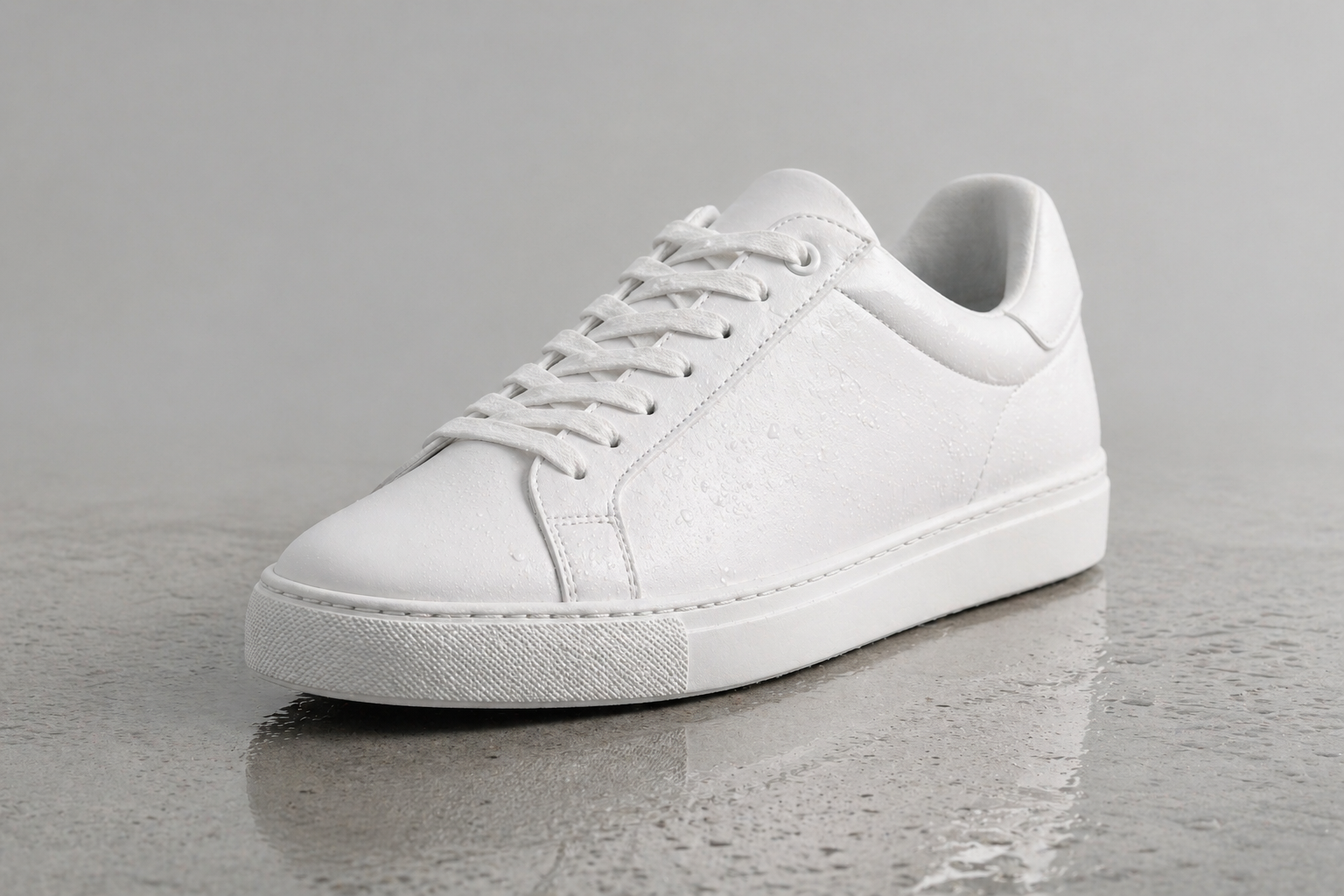
A [product: white minimalist sneaker] on a polished concrete surface,
viewed at 45 degrees from the front-left.
Studio soft-box lighting from the right side.
Subtle water droplet reflections on the upper material.
Matte light gray background.
High-end commercial product photography. Zero AI feel.
Landscape, 1536×1024.
Seedance 2.0:
@Image1 as the product and scene reference.

Camera orbits slowly from the 45-degree view around
to a straight-on frontal view over 6 seconds.
At 3 seconds, cut to a 1-second macro close-up
of water droplets sliding down the material.
Return to the full product view at 4 seconds.
Orbit completes at 6 seconds.

Audio: clean studio silence, single subtle surface tap at end.
Template B: Cinematic Portrait / Brand Story
GPT Image 2:
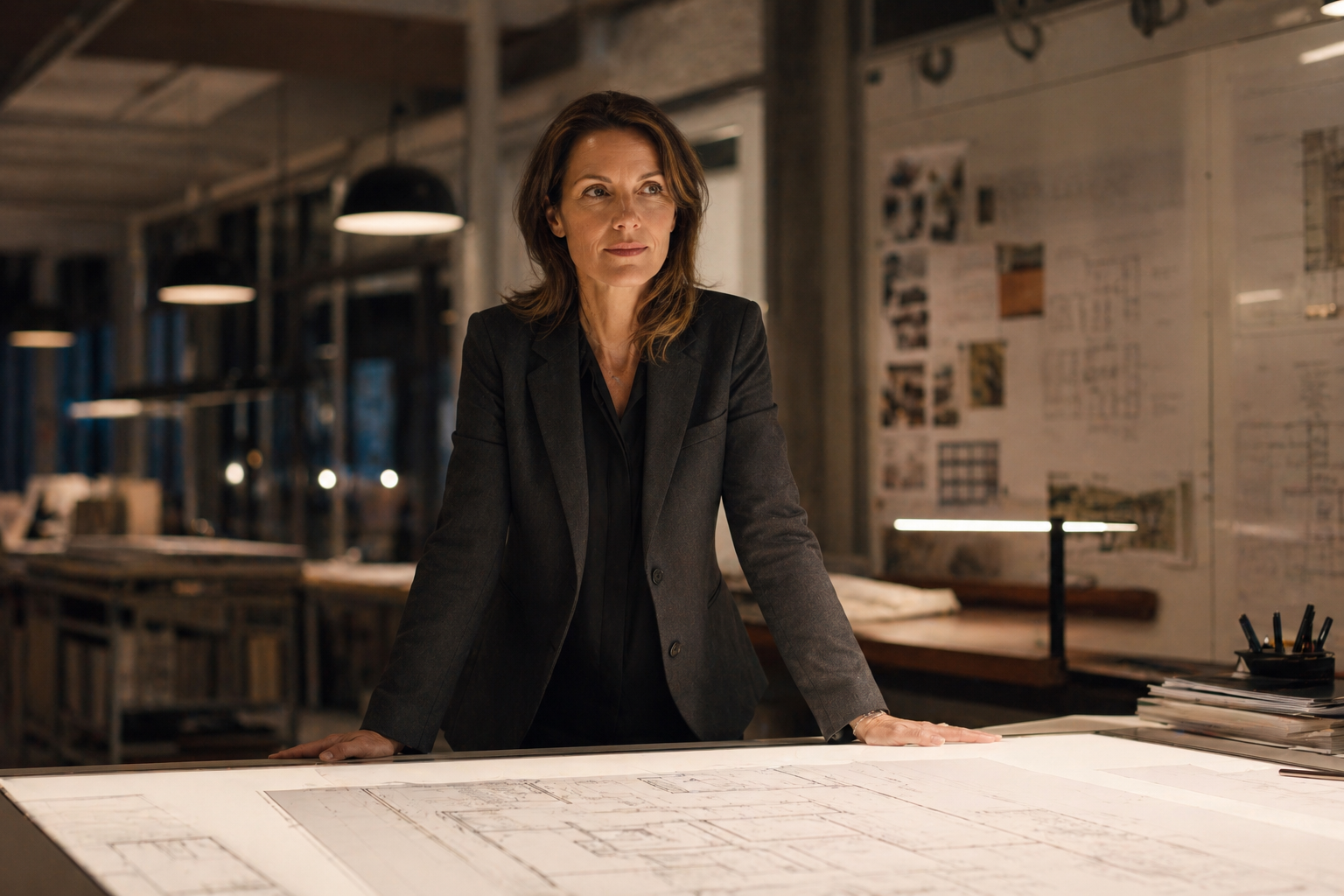
A [profession: architect] in her early 40s,
wearing a structured charcoal blazer,
standing in front of an expansive floor plan spread on a light table.
She's looking slightly off-camera, thoughtful expression.
Architectural studio environment, evening, warm overhead pendant lighting.
Professional editorial photography. No AI feel.
Landscape, 1536×1024.
Seedance 2.0:
@Image1 as the character and scene reference.
Maintain face and clothing exactly.

She slowly shifts her gaze from off-camera
to looking directly at the lens.
A quiet, knowing expression — half-smile.
Her hand moves slightly, as if she's about to gesture.

Camera pushes in slowly from chest-height framing
to a close-up on her face over 8 seconds.

Audio: quiet studio ambience,
distant muffled city sounds through glass, no music.
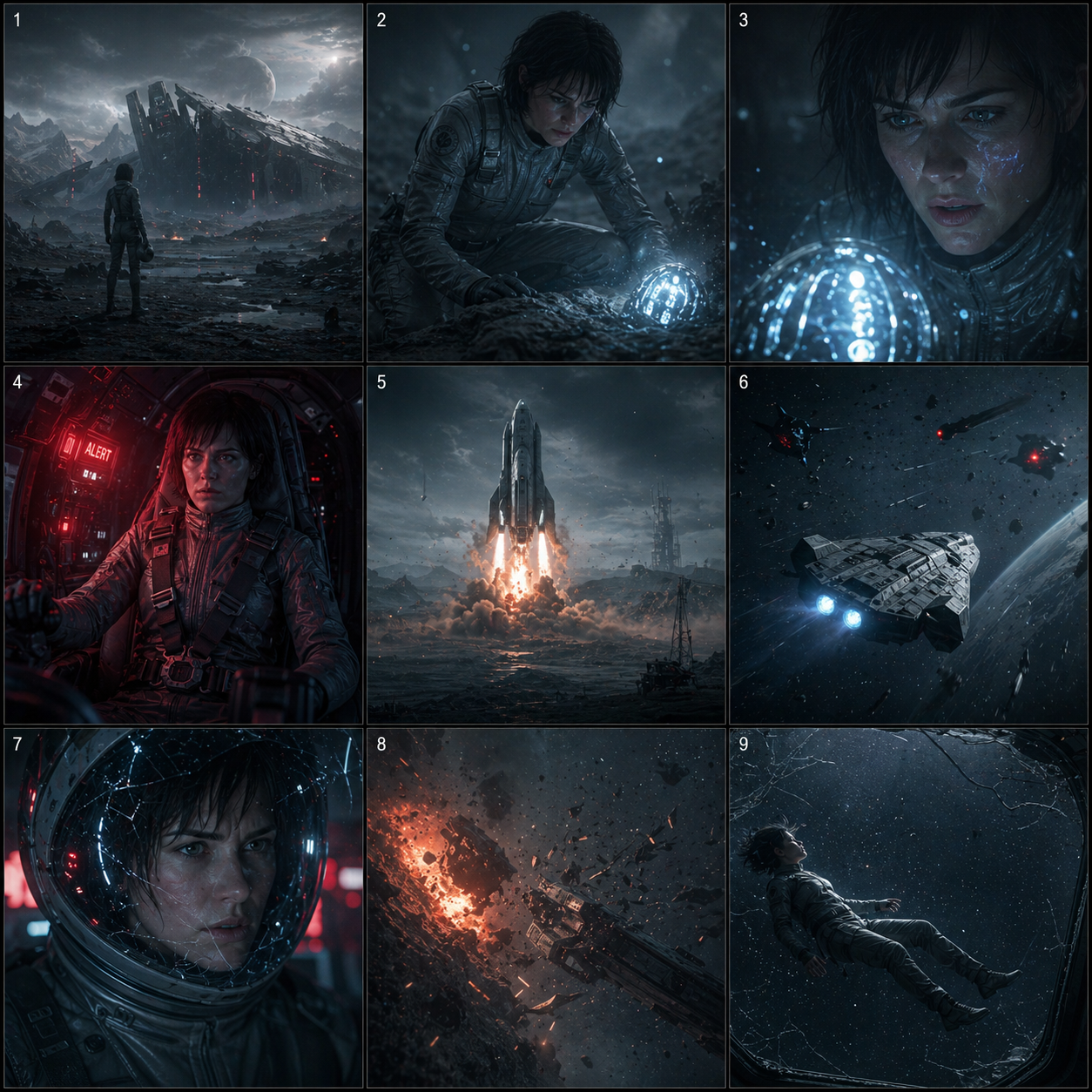
Template C: 3×3 Storyboard — Sci-Fi Trailer
GPT Image 2:
A 3×3 cinematic storyboard grid for a sci-fi thriller trailer.
Consistent visual style: desaturated blue-grey tones,
neon accent lighting, heavy atmosphere and particle effects.
Same female protagonist (30s, short dark hair, silver flight suit)
appears across relevant panels.

Panel 1: Wide exterior — desolate alien planet surface,
         spacecraft wreckage in distance, protagonist silhouette.
Panel 2: Medium — protagonist examining a glowing artifact
         half-buried in ash.
Panel 3: Close-up — artifact reacting,
         light pulsing across protagonist's face.
Panel 4: Interior — spacecraft cockpit,
         red alert lighting, protagonist strapping in.
Panel 5: Exterior wide — spacecraft launching from planet surface,
         dust and fire.
Panel 6: Space shot — vessel pursued by unknown objects.
Panel 7: Cockpit interior — protagonist's face through cracked visor,
         determination.
Panel 8: Impact sequence — explosion, debris field.
Panel 9: Title card space — protagonist floating in silence,
         stars visible through a cracked viewport.

Thin panel borders. Square overall format. 2K resolution.
Seedance 2.0 (upload to the multimodal interface):
@Image1 is a 3×3 storyboard grid.
Animate as a 15-second sci-fi trailer — each panel is one shot.
Read left-to-right, top-to-bottom.

0:00–1.5s Panel 1: Slow descent from above planet surface.
                   Wind moves ash across the landscape.
1.5s–3s Panel 2: Protagonist kneels. Camera circles slowly.
                   Artifact begins to pulse.
3s–4.5s Panel 3: Flash of light. Camera pushes to extreme close-up.
4.5s–6s Panel 4: Red alert strobing. Protagonist moves with urgency.
6s–7.5s Panel 5: Launch sequence. Camera tilts up following vessel.
7.5s–9s Panel 6: Tracking shot — objects close in from the dark.
9s–10.5s Panel 7: Extreme close-up through visor. Breath condensation.
10.5s–12s Panel 8: Impact. Camera shakes. Slow-motion debris.
12s–15s Panel 9: Silence. Protagonist floating.
                   Slow pull back through cracked viewport into space.

Audio: Begin with tense silence and low drone.
Build through mid-section with synthetic percussion.
Final shot: sudden quiet, only deep resonance.
SFX: wind, artifact hum, launch engine, debris impact, silence.
Template D: AI UGC-Style Product Ad
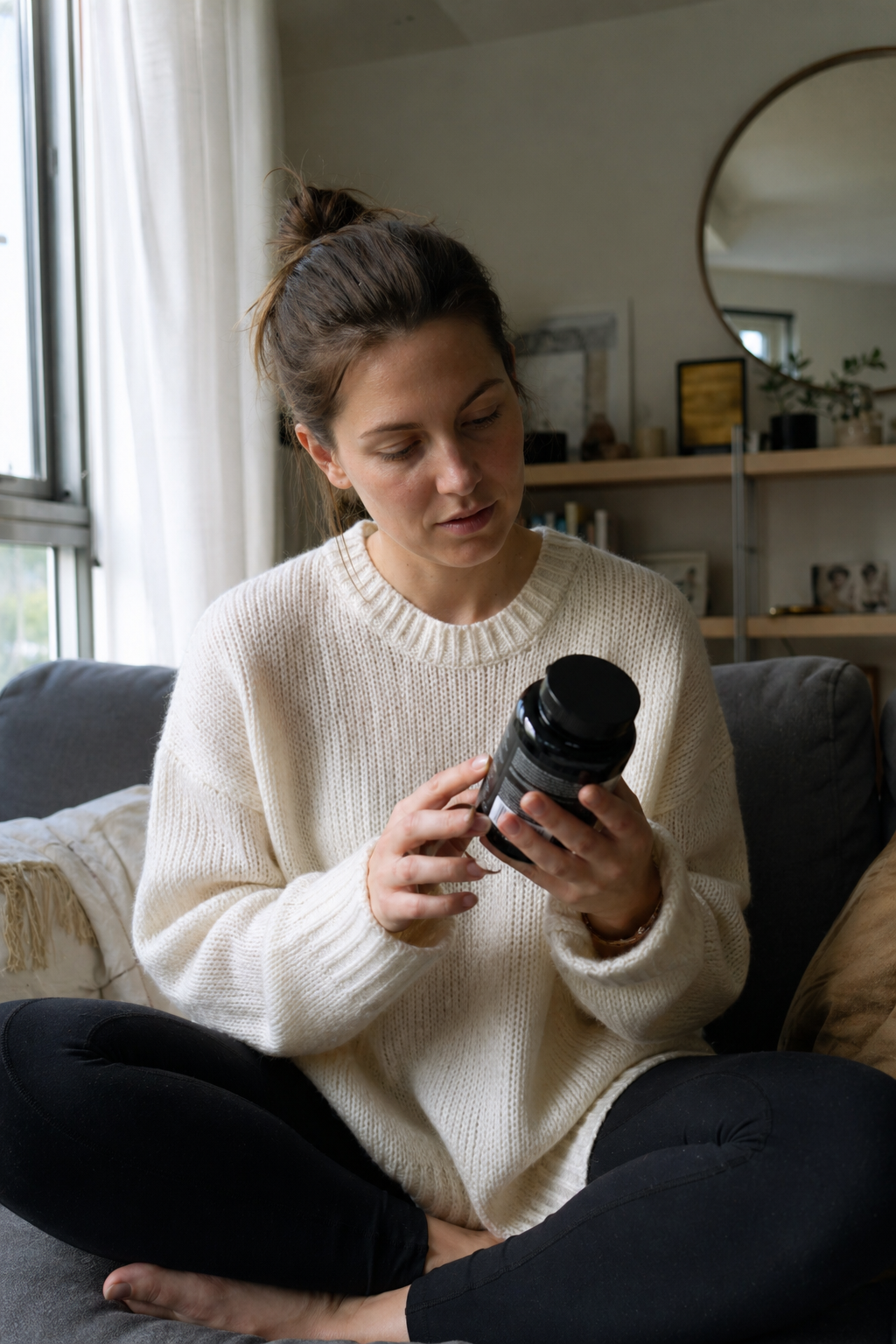
GPT Image 2:
A natural, candid-feeling photograph of a woman in her late 20s,
sitting cross-legged on a sofa in a cozy apartment,
holding a [product: sleek black supplement bottle] in both hands,
reading the label with genuine curiosity.
Natural daylight from a window to her left.
She's wearing a casual oversized cream sweater.
No makeup, relaxed posture — authentic, not posed.
Ultra-realistic, no AI feel, like a friend's photo.
Portrait, 1024×1536.
Seedance 2.0:
@Image1 as the character and scene reference.
Maintain face and clothing exactly.

She stops reading the label and looks up at the camera
with a natural smile — like she just noticed someone filming.
She holds up the bottle slightly toward the camera,
then nods once as if to say "try this."

Camera is static. All motion from the subject.

Audio: cozy apartment ambience — distant street,
soft interior sounds. No music.
Template E: Atmospheric Travel Content
GPT Image 2:
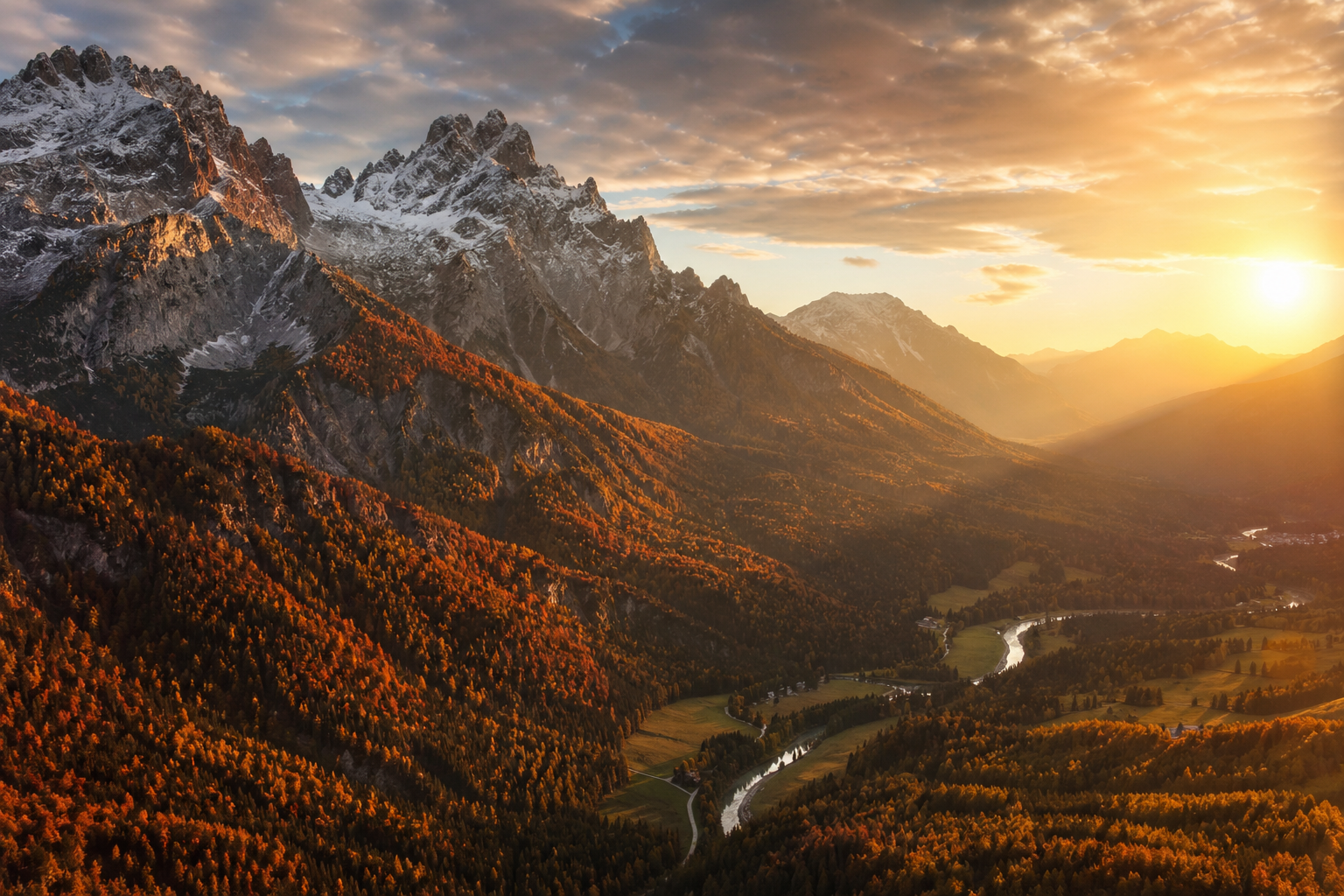
Ultra-realistic aerial photography:
autumn valley in [location: the Dolomites, Italy].
Dramatic rocky peaks covered in first snow at the summit,
middle elevations showing orange and red autumn forest,
valley floor with a winding river catching afternoon sun.
Golden hour lighting from the right side,
long shadows across the valley.
Wide angle. Pure photography aesthetic, not illustrated.
Landscape, 1536×1024.
Seedance 2.0:
@Image1 as the scene reference.

Camera glides slowly forward at medium altitude,
just above the treetops of the autumn forest.
The river comes into view in the lower frame as the camera advances.
Speed is deliberate and calm — not a flyover,
more like a slow sailing descent.
Leaves visible in wind movement in foreground.
Light shifts subtly warmer over the 10-second duration.

Audio: mountain wind through trees,
distant water sound emerging as river comes into view. No music.
Common GPT Image 2 to Video Problems and Fixes
The grid appears as the opening frame of my trailer.
Known Seedance behavior. Two fixes: (1) trim first 0.5–1s in post, or (2) make Panel 1 and Panel 2 the same image so the "grid rendering moment" lands on a shot that flows naturally.
My character looks different between clips. This is the most common issue in AI video generation.
Three causes: inconsistent tagging (use exact same @Character1 label every time), reference strength variation (keep at 75%), or different reference images. Generate a single authoritative character sheet and use it as the sole anchor.
Camera movement ignores my instructions.
Your text description competes with the reference image's implied motion. If the reference has strong implied motion or a dramatic angle, the model may follow the image's visual logic. Fix: use a neutral, compositionally calm reference, and upload a separate video reference to demonstrate the camera move.
Audio doesn't match visual energy.
Audio direction at the end of a long prompt gets deprioritized. Move audio spec higher, or use an actual audio file via @Audio1. A real audio reference always beats a text description.
GPT Image 2 hits content safety filters.
Add age, professional context, setting, and clothing explicitly. Remove ambiguous language. Being maximally specific — not more casual — is the fix.
Storyboard panels don't all animate at the same quality.
Panels with clean subject-background separation and implied motion directions animate better. Complex or cluttered backgrounds animate less predictably. Simplify ambiguous panels.
Short prompt vs. long prompt: which wins?
For single-image generation, 3–5 sentence motion-focused prompts outperform 20-sentence exhaustive prompts. For storyboard grids, timestamp-structured prompts are the exception — they need detail because you're directing 9 shots.
Batch-generating reference variations.
GPT Image 2's Thinking Mode (up to 8 images per request) is ideal for generating multiple reference angles. Produce your character sheet, scene variations, and alternate framings in one go, then select the best for Seedance uploads.
Final Thoughts: The Future of AI Video Workflows
The GPT Image 2 + Seedance 2.0 combination is the most capable AI content pipeline available in 2026, and both tools are still in early iteration cycles. The storyboard grid technique in particular feels like it's only beginning to be understood — the community has been experimenting for days, not months.
What's already clear:
- A one-person creator can now produce multi-shot cinematic content that previously required a film crew
- Character consistency across a multi-clip project — once the hardest problem — is now achievable at ~80–95% visual fidelity with the right reference workflow
- Native audio generation eliminates an entire post-production step for a large category of content
- The storyboard grid technique gives director-level control over pacing, composition, and narrative structure before any video model is involved
The practical limitation is length. Fifteen seconds per generation means longer-form content still requires assembling multiple clips. This will likely be addressed in future iterations, but for now, design content in 10–15 second modules assembled in CapCut or DaVinci Resolve.
For creators who want to start without navigating regional access issues, justdance.cc/ai-image-to-video is the fastest on-ramp to the core image-to-video workflow, and the multimodal interface opens up the full capability for character-consistent, audio-driven, director-controlled production.
The starting point: generate one image in GPT Image 2, upload it, write a 4-sentence motion prompt, and see what comes back. The result is usually better than expected — and that surprise is what turns a first-time user into someone who builds this into their regular workflow.
Last updated: April 2026 | Tool versions: GPT Image 2 (gpt-image-2) / Seedance 2.0